RF Online Next "Server Is Full" — Why You Can't Enter & How to Get In

This is what the error looks like
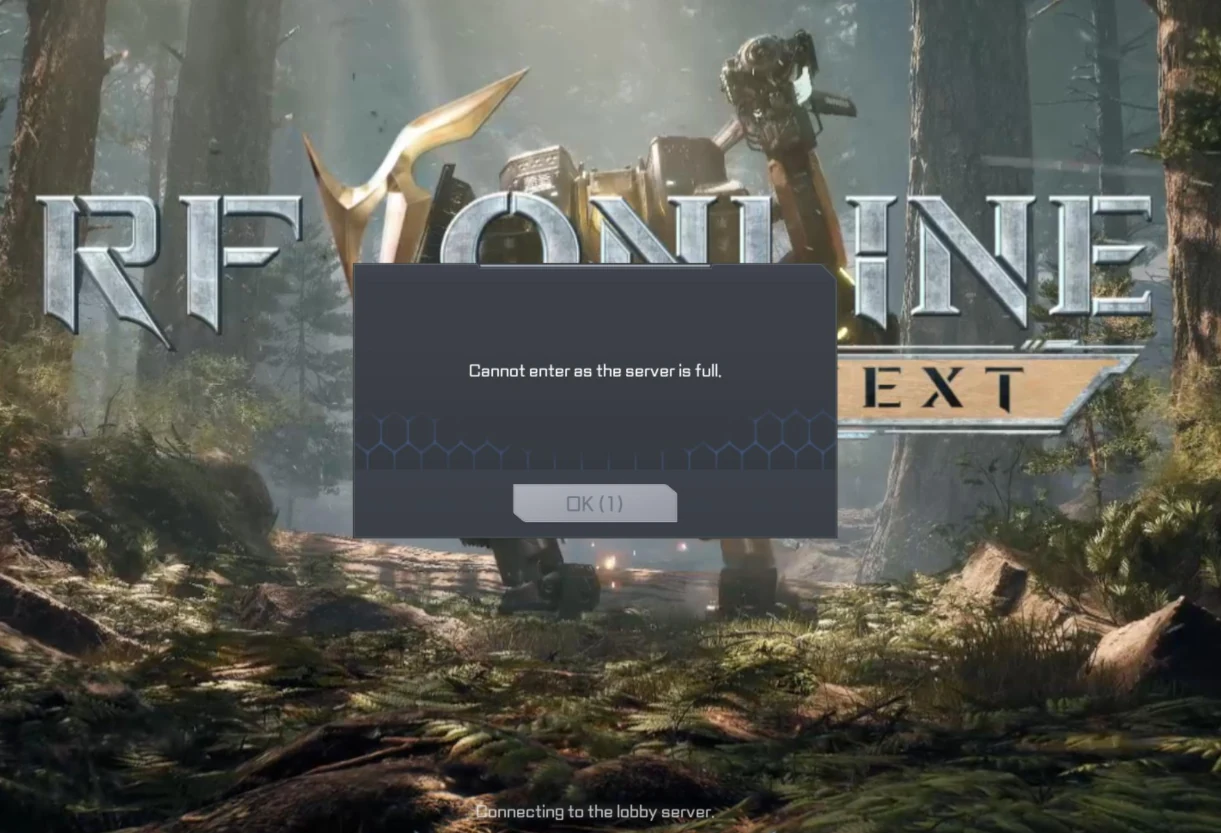
The message lands at the "Connecting to the lobby server" stage with a single OK button and no queue number — a straight rejection, not a place in line. That detail is the whole reason the fix is "pick another server or retry," not "wait it out."
Quick facts
| What it is | A server-side capacity cap at the login gate — the world server hit its concurrent-player limit |
|---|---|
| Is it your fault | No — nothing on your PC, install, or account causes it |
| Fastest fix | At character select, choose another numbered server in your region (e.g. Anka02 instead of Anka01) |
| Already have a character there | Retry the OK button and return outside regional prime time; slots free as players log off |
| Regional servers | Asia2 — Anka · Europe — Inanna · America — Hecate, each with numbered sub-servers |
Why the server is full
Treat this as congestion, not a bug, because that is exactly what it is. Each world server in RF Online Next has a fixed number of slots, and at launch and during regional prime time more people try to log in than the server is built to hold, so the gate starts refusing connections until someone leaves. Netmarble said as much before launch when it warned that character-creation limits apply per server and that some servers filled during pre-creation — a server that is "closed" or "full" is one that already hit its cap.
The important consequence is that there is nothing on your end to repair. The cap lives on the server, so the client is working perfectly when it shows you that message — it is relaying a "no room" answer from the gate, the same way a full car park turns you away no matter how good your car is.
How to actually get in
The single best move depends on whether you have already committed to a character, so start there.
- If you are still at character select, pick a different server in your own region. The regions are grouped into World Servers — Anka for Asia2, Inanna for Europe, Hecate for America — and each holds several numbered sub-servers. Anka01 being full says nothing about Anka02, and they sit in the same region so your ping does not change.
- If you already have a character on the full server, click OK and retry straight away. "Full" is a moment-to-moment state, not a closed door, and a slot opens the instant someone logs out, so a few retries in a row often gets you in.
- Come back outside your region's prime time. The gate is busiest in the local evening, so an early-morning or daytime session walks in where a 9pm session bounces. For Southeast Asian players this is the same peak-hour squeeze that drives the lag on the errors and fixes page.
- Watch the official channels for new servers. Publishers add capacity under launch load — Netmarble opened additional creation on closed servers at launch — and a fresh server is the emptiest place to land. The news page tracks those additions.
If you're already invested in a full server
This is the genuinely annoying case: you have hours on a character and the server it lives on keeps turning you away. You cannot freely hop to an emptier server, because progress is tied to the one you built on. The only official way across is the Server Transfer feature, and it is gated — community guides report it needs around character Level 55, costs roughly 100 credits, and only opens in short windows every few weeks rather than on demand. Treat those numbers as provisional and verify them in your client before you count on them. For a brand-new player, transfer is the wrong tool; just start on a server that lets you in.
What won't help
Skip the rituals that feel productive but cannot touch a server cap. Reinstalling the game, verifying or repairing files, switching your DNS, and firing up a gaming VPN or booster all act on your PC or your network route, and none of them adds a slot to a full server. Those tools earn their place against crashes and high ping — which is why they live on the errors and fixes page — but against "server is full" they only cost you time. The one exception worth naming is that a VPN can occasionally place you on a different regional routing, but that is a side effect, not a fix, and picking another server does the same thing cleanly.
FAQ
What does "Cannot enter as the server is full" mean?
The world
server you chose has hit its concurrent-player cap, so the login gate is refusing new
connections. It is a server-side limit, not a fault on your PC or account, and it eases
as players log off.
How do I get in when the server is full?
If you haven't made a
character yet, pick another numbered server in your region — Anka02 instead of Anka01.
If you already have a character there, retry the OK button and return outside regional
prime time.
Can I switch servers if mine is full?
Before you create a
character, yes — choose another server in the same World Server (Anka, Inanna, or
Hecate). After you've invested in a character you can't move freely; the only official
route is the limited Server Transfer feature.
Will reinstalling or a VPN fix it?
No. Reinstalling, file
verification, DNS changes, and VPNs target your PC or network route, not a cap that
lives on the server. Those are crash-and-ping fixes, not capacity fixes.
Is there a queue?
The launch message is a hard rejection at the
lobby stage with no visible queue counter, so you retry rather than wait in line.
Whether a numbered queue appears under different load isn't confirmed — verify in your
client.
Related guides
If your problem is really lag, crashes, or a fatal error rather than a full server, the errors and fixes page handles those in order. New to the game once you're in? The Beginner Guide and the First 24 Hours checklist tell you what to do first, and the Starter Finder points you at the right Biosuit before you pick a server.
Sources & method. The regional World Server names (Anka, Inanna, Hecate) and the per-server creation caps are from Netmarble's official RF Online Next pre-creation and launch notices. The Server Transfer requirements (Level 55, ~100 credits, periodic windows) are community-reported and not officially confirmed here — verify in your client. The screenshot is a reader-submitted capture of the live error; booster and VPN references are descriptive, not endorsements, and we take no affiliate links.
Last updated: 23 June 2026 · launch period. What changed: first publish.